APEXAdvance Plant Excellence

APEX · Advance Plant Excellence

The intelligence layer above any SCADA

APEX connects every protocol into one console, puts thermal eyes on transformers, switchgear and cables, watches the condition of every electrical asset, turns losses into money, writes the reports and forecasts tomorrow. Your SCADA keeps control.

Built in the Philippines by Ambas Electric & Automation for generation plants, substations and industrial electrical systems.
  • 5 field protocols, read-only
  • 13 pillars, one rail
  • Thermal cameras built in
  • Built in the Philippines
IEC 60870-5-104DNP3Modbus TCPOPC UAMQTT Sparkplug BISA-101 HMIISA-18.2 alarmsIEC 61724-1GADS / IEEE 762Radiometric thermalOPC UA server outRead-only to the plantIEC 60870-5-104DNP3Modbus TCPOPC UAMQTT Sparkplug BISA-101 HMIISA-18.2 alarmsIEC 61724-1GADS / IEEE 762Radiometric thermalOPC UA server outRead-only to the plant
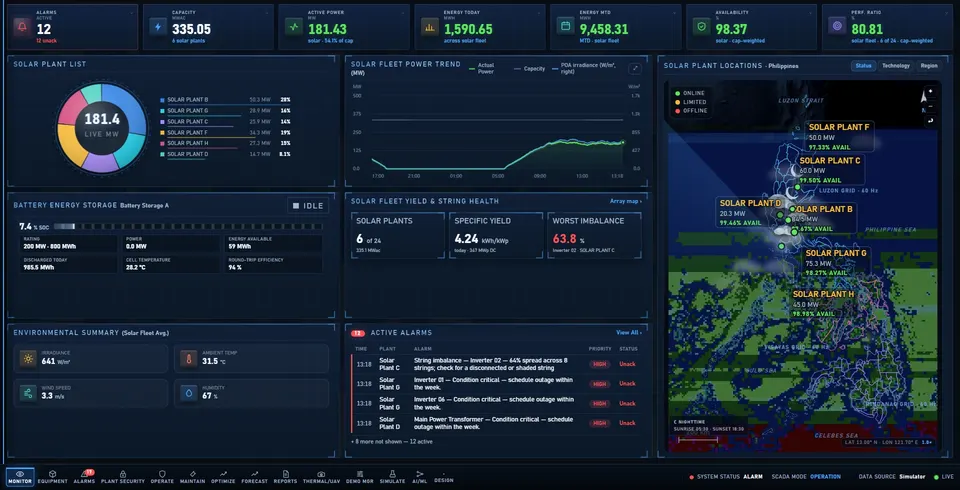
APEX Fleet Overview: KPI strip, plant list, power trend, battery storage, active alarms and a Philippine plant map
Fleet Overview: the home screen of the console. Screens shown use simulated demonstration data.

One Windows application for control rooms, substations and electrical rooms.

The problem

Control rooms are drowning in separate screens

Plant data, cameras and reports each live in their own tool.

Too many logins

SCADA, inverter portals, CCTV and spreadsheets each need their own login and their own screen.

Hot spots found late

Overheating panels, cables and switchgear are found on a site walk-down instead of the moment they start.

Reports built by hand

Every day and month, staff copy numbers between systems to write the same reports again.

APEX answers with one console that monitors, alarms, records and reports across the whole fleet, with live thermal cameras built in.

Where APEX sits

SCADA shows. APEX understands.

APEX reads your existing systems and adds intelligence at the layer above them. Nothing underneath changes.

APEXIntelligence layer
One data hub · thermal eyes · asset condition · fleet analytics · losses in money · automated reports · forecasting · guided alarms · training sandbox · provenance. Portfolio reports, recoverable energy and money, GADS availability, curtailment revenue, forecasts.
Existing SCADA, PLC, RTU, relaysControl and protection
Operates breakers, inverters and setpoints; protects the system. Untouched. APEX reads it and never writes to it.
Field equipmentWhat is measured
Transformers, breakers, switchgear, inverters, meters, battery storage, wells, weather stations, thermal cameras, door controllers.

Read-only to the plant. APEX adds intelligence without adding risk. The only thing it ever commands is a door lock, under operator roles.

What SCADA does not do

Twelve things a traditional SCADA does not do

Each one is built into APEX today.

01

One connection point

IEC 104, DNP3, OPC UA, Modbus and Sparkplug B in; one OPC UA server out.

02

Thermal eyes on electrical assets

Switchgear, busbars, cable terminations and transformers watched 24/7, with alarms.

03

Asset condition, not just points

Transformer DGA, OLTC tap, top-oil and winding; switchgear SF₆ and contact wear.

04

Fleet across technologies

Generation plants and substations on one Philippine grid map.

05

Losses and curtailment in money

Every lost kWh gets a cause, an owner and a cost; grid instructions are journalled.

06

Reports that write themselves

PDF and Excel per plant or portfolio, with GADS availability indexes.

07

Forecasting

24-hour and 7-day output with a confidence band.

08

Explainable analytics

Anomalies and maintenance ranking, with the method shown openly.

09

Guided alarm response

ISA-18.2 shelving, alarm journal, likely causes, O&M manual lookup.

10

Train without touching the plant

Scenario injection, output sandbox, self-running showcase.

11

Physical access in view

Substation and plant doors in the same console as the equipment.

12

Provenance on every number

Measured, modelled and simulated are never blended.

Who it is for

One console across the power and electrical industry

Generation, grid and industrial electrical systems share the same assets and the same questions.

Generation

  • Solar, battery storage, geothermal, coal, LNG and gas plants
  • Fleet and plant dashboards
  • Losses, curtailment and forecasting
  • GADS availability indexes
  • Steam field management
For generation companies

Transmission and distribution

  • Substations, feeders, distribution utilities and electric cooperatives
  • Transformer condition: DGA, tap, oil, winding
  • Switchgear: SF₆ density, contact wear
  • IEC 60870-5-104 and DNP3 native
  • Substation door access in view
For utilities and cooperatives

Industrial and commercial

  • Factories, economic zones, data centres, hospitals, large buildings
  • Thermal watch on switchgear, busbars, cable terminations
  • Modbus and OPC UA to existing PLCs and meters
  • Alarm journal and guided response
  • Reports for management and insurers
For facilities

At a glance

One Windows desktop application for control rooms, substations and electrical rooms

13pillars on the navigation rail
5field protocols read live, plus cameras
5generation technologies, plus substations
24/7thermal and visual recording
  • Built for operators: screens follow the ISA-101 high-performance HMI hierarchy, and alarms follow ISA-18.2.
  • Built to be trusted: measured, modelled and simulated values are always labelled differently.
  • Built in the Philippines: by Ambas Electric & Automation, an electrical contractor, for Philippine plants, grids and factories.

Numbers you can trust

APEX follows three rules on every screen

Measured is never mixed with modelled

A value from a sensor and a value from a model are labelled differently and never blended into one number.

Missing data reads --, never zero

A dead link shows as missing. It is never shown as zero output that looks like a real reading.

Simulated data is always badged

Anything simulated carries a visible badge, so a demo can never be mistaken for a live plant.

See APEX run on a simulated fleet, then scope your plants

Showcase mode walks the important functions in about four minutes. After that we list your SCADA points, protocols and camera positions.